How to Find Company Details from a GST Number
Two halves to it: what's in the fifteen characters, and what's only on the portal.
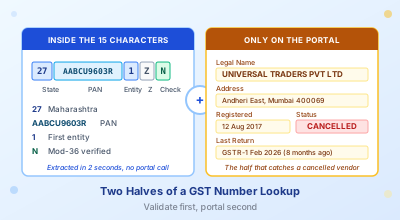
Your accounts team gets a fresh vendor invoice on Monday morning. The GSTIN looks fine — fifteen characters, looks the part, the check digit even validates. By Friday someone notices the supplier has been sitting cancelled on the portal since February, and the eight bills the team has booked under that GSTIN have just become disputed ITC. The number passed every check the team made on it, because nobody actually checked the portal.
That is the gap this post is about. There are two halves to a GST number lookup. The first half lives inside the fifteen characters of the GSTIN itself: state, PAN, the entity number, the placeholder, the check digit. All of it extractable in two seconds, no portal call required. The second half (legal name, address, registration date, filing status, whether the registration is currently active) only exists on the GST portal, and is the half that catches the cancelled vendor before the cancelled vendor catches you.
Most "how to find a GST number" posts skip this distinction. They tell you to go to the portal, type the GSTIN, and read the result. Fine as far as it goes. What they miss is that the structural validation should happen first, that the portal can lie to you about active status if you only look once a year, and that there are at least four situations where the portal call is non-negotiable.
What the Fifteen Characters Actually Carry
The state code sits in the first two digits. 27 is Maharashtra, 29 is Karnataka, 07 is Delhi, 33 is Tamil Nadu, and the full mapping runs from 01 (Jammu and Kashmir) to 38 (Ladakh). If your invoice's GSTIN starts with 27 and the printed address says "Bengaluru, Karnataka", you have already found a problem before checking anything else. The state code on the bill must match the state of the principal place of business on the registration. Edge case worth flagging: a business can have multiple GSTINs across states, but each invoice carries the GSTIN of the issuing state, not a head-office GSTIN.
Characters three through twelve are the supplier's PAN. Same ten characters that appear on every income tax document the business files. If you have the supplier's PAN from anywhere else (a contract, a bank document, a TDS certificate) you can verify the GSTIN by checking that those middle ten characters match. A mismatch here means either the GSTIN is fake or the PAN you were given is wrong, and you need to figure out which before booking anything.
Character thirteen is a number from 1 to 9, the entity number under that PAN. The first GSTIN under any PAN is "1", the second is "2", and so on. A business with three branches across three states will typically have three GSTINs, each with the same PAN core but a different state code in front and a different entity number at position thirteen. Some businesses use position thirteen for vertical separation within the same state. The mechanics are the same.
Character fourteen is "Z". Always. It is a placeholder reserved by the GSTN architects for future use. If the fourteenth character of a GSTIN is anything except Z, the GSTIN is fake. There is no other story. I have never seen a real-world GSTIN with anything other than Z at position fourteen and I do not expect to.
Character fifteen is the check digit, computed from the previous fourteen by a mod-36 algorithm (the GSTN borrowed it from Luhn but adapted to base 36 to handle alphabetic positions). A typo anywhere in the first fourteen characters will land on the wrong check digit roughly thirty-five times out of thirty-six. That is why a structural validator catches almost all copy-paste errors before they ever hit the portal, and it is why the GSTIN Validator is worth running on every supplier number once before you book the first bill from them.
What Only the Portal Can Tell You
Everything past the structural validation requires a portal call. Whether the registration is currently active is the primary question, and the only place to ask it is the portal. Beyond status, the lookup returns the legal name of the entity, its trade name (often different from the legal name), the principal place of business, any additional places of business, the taxpayer type, the registration date, and the most recent return filed. None of these are encoded anywhere in the fifteen characters. None can be derived from any local computation. You have to ask.
The reason this matters is that a structurally valid GSTIN can still be cancelled, suspended, or registered to a completely different entity than the one printing it on the invoice. Cancelled GSTINs are particularly painful because they look fine on the bill: same fifteen characters, same Z at position fourteen, same valid check digit. The only signal that something is wrong is the status field on the portal, and that field flips quietly. Suppliers rarely tell their customers when their registration has been cancelled, especially when the cancellation is suo motu.
The Two-Step Workflow
The right sequence is validate first, then portal lookup. Validation is free and instantaneous, and catches the typo class of errors before they cost you a portal call. The portal endpoint is rate-limited (around fifty queries per IP per day on the public search, more if you have a registered API client), and you do not want to burn one of those calls on a GSTIN with a transposed digit.
The GST Number Search tool on this site does both halves in one screen. Paste the GSTIN, get the structural breakdown immediately (state, PAN, entity number, check digit pass/fail), then see the registry details right there for 1 credit, or click through free to the portal with the GSTIN pre-filled into the search field. The portal call itself runs against the official GST infrastructure, not via a third-party scraper, which matters because some of the older "GSTIN lookup" tools ran their own caches and were occasionally serving stale data on cancellations.
Validate Now, Then Portal-Check in One Click
Paste a GSTIN and get the structural breakdown plus the prefilled portal link in one screen. Free format check; business details use 1 credit.
Open GST Number SearchThe Cancelled-GSTIN Trap
A GSTIN that was active when the bill was issued can be cancelled by the time you book it. The cancellation can be voluntary (the supplier shut shop, restructured the business, dropped below the threshold), suo motu (the department revoked it for non-filing or compliance breaches), or retrospective (a reversal that backdates the cancellation by months).
The retrospective case is the worst. If the department cancels a registration with effect from a date in the past, every invoice issued after that effective date is treated as having been issued by a non-existent registration. ITC claimed on those invoices is at risk under Section 16, the bills may need credit-note reversal, and your books have to be cleaned up at the next reconciliation. The supplier might not have communicated the cancellation; you are the one who has to know. I see the retrospective cancellation case roughly once a year on every supplier list of any size, and almost never with prior warning from the supplier.
A monthly check on your top-twenty supplier GSTINs takes about ten minutes if you script it, fifteen minutes if you do it by hand on the portal. That is the cheapest insurance you can buy against an ITC reversal six months later. The cancellation usually surfaces at GSTR-2B reconciliation when the supplier's GSTR-1 stops appearing in your 2B, but by then you may already have booked another month's worth of bills under the dead registration.
When the Portal Check Is Non-Negotiable
There are four situations where the portal step stops being optional.
The first is vendor onboarding. Before the first PO goes out to a new supplier, the GSTIN gets validated and the portal status confirmed. The first invoice from a new vendor is the wrong place to discover their registration was suspended last month.
Then there is pre-payment due diligence on large-value bills. Anything material enough to hurt if the ITC gets reversed should get a portal check at booking time, not at reconciliation three weeks later. What counts as material is whatever feels material to your business. For a kirana store, ten thousand rupees might be the line. For a wholesale FMCG distributor running fifty SKUs and a hundred suppliers, it is closer to fifty lakh.
Audit responses are the third, and the most quietly important. If a department officer queries why you booked a particular bill and you cannot show evidence that you verified the GSTIN at booking time, the burden of disproving connivance shifts toward you. Section 16 and Section 74 both treat the recipient's diligence as a relevant factor. In my experience the diligence-trail question comes up more often than the substantive ITC question, especially in the kind of routine assessment most businesses see every two or three years.
Fake-invoice screening is the fourth and the most binary. A bill carrying a GSTIN that does not exist on the portal at all, or worse, a GSTIN registered to a totally different business than what the invoice header claims, is the strongest single signal of invoice fraud, ahead of even a missing QR code. The structural validator catches the obviously-fake fifteen-character strings; the portal lookup catches the carefully constructed ones registered to a shell company that exists on paper but not in reality.
What the Portal Page Actually Shows
A successful lookup on services.gst.gov.in returns about a dozen fields. The ones you actually look at are: legal name, trade name, principal place of business, additional places of business if any, taxpayer type, registration date, status (Active, Cancelled, or Suspended), and the most recent return filed.
Status is the field you check first. If it is anything other than Active, stop and investigate before booking any further bill from this supplier.
Most recent return filed is the field you check second. A supplier whose last filed GSTR-1 was six months ago is going to cause you reconciliation problems even if their status is technically Active. The Section 16(2)(aa) rule, as enforced through 2B since 2024, blocks ITC on any invoice where the supplier has not filed GSTR-1 within forty-five days of its due date. A supplier who is consistently late on GSTR-1 is carrying that delay onto your books every single month, and your reconciliation is going to feel it.
Related Tools
- GST Number Search — structural breakdown plus prefilled portal lookup, in one screen
- GST Search by PAN — the PAN-side counterpart: find every GSTIN registered under one PAN across India
- GSTIN Validator — structure-only check (state, PAN, entity, mod-36 checksum), no portal call
- GST State Code List — the full 01-38 mapping for the first two characters of every GSTIN
- GST Invoice to Excel — pull GSTINs and other fields out of a folder of vendor PDFs into Excel
- How to Verify a GSTIN Online — the structure-only validation walkthrough, the precursor to a portal lookup
- GSTR-2B Reconciliation in Excel — where cancelled-supplier problems usually surface, three weeks too late
- The GST QR Code on Your Invoice — the second buyer-side check that catches fakes
- CGST vs SGST vs IGST on Your Invoice — why the state code in the GSTIN drives the tax type on the bill
- GSTR-9 for FY 2025-26 — the year-end annual return where supplier GSTINs get tied back to your purchase register and the ITC reconciliation closes out
Verify Vendor GSTINs Before You Book the Bill
Paste a GST number, get the structural breakdown plus a one-click route to the official portal lookup. Free format check; business details use 1 credit.
Open GST Number SearchFrequently Asked Questions
How do I find the company name from a GST number?
There are two halves to it. The structural part (state code, PAN, entity number, check digit) sits inside the fifteen characters of the GSTIN and you can extract it instantly without going anywhere. The legal name and trade name of the company is the other half, and that only exists on the official GST portal at services.gst.gov.in. Enter the GSTIN on the portal's Search Taxpayer page and the result returns legal name, trade name, address, registration date, and current status. Use a structural validator first to catch typos before burning a portal call.
Can I search a GST number by company name on the portal?
Not directly. The official portal supports search by GSTIN/UIN, by PAN, or by composition taxpayer status. Search by company name is not a public option. If you have the supplier's PAN from any other document (a contract, an NDA, a bank document), the PAN search will return every GSTIN registered under that PAN, which is usually enough to identify the right one when a business operates across multiple states.
What does each character of a GSTIN mean?
The first two characters are the state code (27 is Maharashtra, 07 is Delhi, 29 is Karnataka, with the full mapping running 01 to 38). Characters three to twelve are the supplier's PAN, the same ten characters used on every income tax document. Character thirteen is the entity number under that PAN, so a business with three GSTINs in the same state would have entity numbers 1, 2, and 3. Character fourteen is always Z, a reserved placeholder. Character fifteen is the check digit, computed by a mod-36 algorithm on the first fourteen characters. A typo anywhere in the first fourteen characters lands on the wrong check digit about thirty-five times out of thirty-six, which is why a structural validator catches most copy-paste errors instantly.
Why does the portal show Cancelled for a GSTIN on a recent invoice?
Three possibilities. The supplier voluntarily surrendered the registration (shop closed, business restructured, threshold dropped). The department cancelled it suo motu for non-filing or compliance breaches, usually with a notice trail. Or the cancellation is retrospective, meaning the department backdated it to a date in the past — any invoice issued after that effective date is then treated as coming from a non-existent registration and the ITC claimed on it is at risk. The retrospective case is the painful one because the bill looks fine on paper. Section 16 lets the buyer's ITC be reversed, and the credit-note workflow has to clean it up at the next reconciliation.
Is there a free way to check GST numbers in bulk?
The official portal does not support bulk lookup on the public endpoint. Single lookups are free and unlimited. For bulk verification (a hundred suppliers, monthly check), most accountants either script against the GST API or use a paid reconciliation product. Honestly, for under fifty active suppliers, doing it by hand on the portal once a month is faster than setting up the API integration.