GSTR-2B Reconciliation in Excel
Beating the Zero Mismatch Policy that started on 1 April 2026.
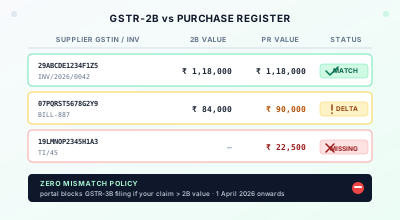
The reconciliation template, free
Paste GSTR-2B on one sheet and your purchase register on the other. Every row is matched on
supplier GSTIN + invoice number and tagged Matched, Value mismatch,
Missing in books or Missing in 2B, with a summary that totals
the ITC that is actually safe to claim. Invoice numbers are normalised for case and spacing, so
inv 002 in your books still matches INV002 on the portal. No macros —
works in Excel, LibreOffice and Google Sheets.
If you are reading this on the morning of the 19th of any month from now on, and your GSTR-3B for the previous tax period is still open, you already know what changed on 1 April 2026. The portal will not let you file. Until your claimed ITC in Table 4 lines up with the figure auto-populated from GSTR-2B, the submit button stays grey. The earlier game of filing with a small overclaim and explaining it later in correspondence is over. That tolerance has been pulled. Welcome to the Zero Mismatch Policy.
The change has been telegraphed for the better part of a year. Notification 16/2025 in September 2025 ended the automatic flow of credit from 2B into 3B and made the Invoice Management System the only path through. Tables 3.1 and 3.2 of GSTR-3B got hard-locked back in July 2025. Table 4, the one that actually carries ITC, is the last domino, and it fell on the first of this month. None of this is dramatic if your reconciliation routine is already clean. Without one, the rest of FY 2026-27 turns into the same problem replayed every month, with the same frustrated phone calls to the same suppliers on the 19th.
This post is not a survey of the rule change. Half the GST blogs in the country have written that piece by now. What I want to walk through is the actual workflow on a desk: what your purchase register needs to look like, what the six-day window between 2B drop and 3B due date is for, the three categories of exception you will hit every single month, and how to clear them in Excel without losing your weekend. We will also talk about where invoice extraction fits, because the input layer to all of this is invoice PDFs sitting in a folder somewhere.
What Actually Changed on 1 April
The pieces have been moving since the Invoice Management System went live on 1 October 2024. Up to that point, GSTR-2B was a recipient-side document the portal generated for you and which auto-populated into 3B Table 4. You could trim it down (you couldn't claim more than 2B even then, on paper), but the heavy lifting was at quarter-end audit, not at filing.
IMS introduced Accept, Reject, and Pend. Every B2B inward record showed up on a dashboard and the recipient had to take a position on it. Invoices you did not act on were treated as deemed accepted and slipped into 2B by default, which is still the behaviour today. That part is worth getting clear on, because some commentary has confused this with a separate Section 16(2)(aa) consequence we will come back to. Inaction in IMS does not block your ITC. It accepts the invoice on your behalf, with whatever amount the supplier reported, which is the trap.
Notification 16/2025-Central Tax dated 17 September 2025 then turned IMS from a workflow to a gatekeeper. Effective the October 2025 tax period, GSTR-3B no longer auto-populates ITC from GSTR-2B as a courtesy. Only what you have actively accepted in IMS, or what was deemed accepted by inaction, counts. Tables 3.1 and 3.2 of 3B were hard-locked the same way back in July 2025. Table 4 (ITC) was the last editable surface, and the 1 April 2026 change locks it to the 2B figure as well.
What this means in practice: the only ITC you can claim is what is in 2B, and the only way to influence what is in 2B is to either chase the supplier to file or amend GSTR-1, or to reject inflated entries inside IMS before the 14th. If you do nothing, you get whatever your suppliers reported, accurate or otherwise, and you live with it.
The Six-Day Window
Pull a calendar for any month and the operating constraint becomes obvious. GSTR-1 is due from your suppliers on the 11th. GSTR-2B is generated on the 14th from whatever they filed by then. Your GSTR-3B is due on the 20th if you are a monthly filer, on the 22nd or 24th depending on state if you are on QRMP. Six working days, sometimes less if there is a long weekend in the middle, to do all of the following:
Pull the 2B JSON or Excel from the portal. Export the purchase register from your accounting software for the same period (Tally, Busy, Zoho, ERPNext, all of them give you something workable). Run the match, categorise the exceptions, and email suppliers on the missing entries. Then wait. Suppliers can still file or amend GSTR-1 up to the 13th of the next month, so a chase email on the 14th itself has roughly a week of useful runway. Recompute 2B if the supplier acts (yes, the system allows recomputation after the 14th, right up until you press file on 3B). Reduce the ITC claim where you have to. File.
That whole loop is six days. If you are sitting on three hundred invoices and the supplier-reach process is "we will email someone at month-end", it will not finish in time. The shops that handle this cleanly start on the morning of the 14th, treat the 15th and 16th as the chase window, and use the 17th to 19th to settle whatever has not budged. Wholesale traders feel this hardest. Single-digit-margin businesses cannot afford an ITC overhang for a month, and they tend to have long supplier tails where any one missing GSTR-1 throws the reconciliation off. Service businesses with twenty SaaS bills a month have it easier. Honestly, if your business processes ten or fifteen B2B bills, the whole thing fits into one afternoon and you should not over-engineer it. The pain starts somewhere north of fifty.
What Your Purchase Register Needs to Look Like
Before any matching can happen, your purchase register has to be in a shape Excel can join against the 2B export on a stable key. Most accounting packages will give you something usable on export, but the columns that matter for reconciliation are these.
Supplier GSTIN. Invoice number exactly as it appears on the printed bill, including the slash, the dash, the leading zeros, the lot. Invoice date in a real date format, not text. Taxable value. CGST, SGST or UTGST, IGST as separate columns, not lumped into a single tax column. Place-of-supply state code if you can get it. HSN of the principal item if your accounting software exports it.
Skip the total. I know that sounds counter-intuitive. Match on the tax components instead, because that is the field the portal reconciles on, and round-tripping through the total introduces fifty-paisa drifts that will mark perfectly fine matches as failed. The total is for human eyes; tax components are for the join.
The single biggest cause of false mismatches I see at this stage is invoice number normalisation. The portal's 2B has the invoice number exactly as the supplier typed it on their GSTR-1, including any case difference, leading zero quirk, or punctuation. Your purchase register has it however the data-entry person at your end keyed it in. Build a normalisation column once: upper-case, strip spaces, strip all punctuation except the alphanumeric core. Match on that, not on the raw number. You will recover a surprising percentage of "missing" rows that way.
The Three Buckets of Exception
Once you have the join running, every row in your reconciled sheet falls into one of four states. Matched, present in both with values agreeing. Missing in 2B, in your books but not on the portal. Missing in PR, on the portal but not in your books. Value mismatch, present in both but the numbers disagree.
Matched rows are the easy majority. You accept them in IMS, ITC flows through to 2B as it always did. No further action.
Missing in 2B is the painful one and where the bulk of the chase work goes. Roughly half of these cases are the supplier simply not having filed GSTR-1 for the period yet (small proprietorships drift on this constantly, especially in the first week of a new quarter). The other half splits between the bill having been filed under the wrong recipient GSTIN, usually a copy-paste from a different customer's record, and the bill having been reported in the wrong tax period. Email each one with three things: invoice number, date, and the recipient GSTIN you expect. Ask them to confirm under which return the bill has been reported. Until the supplier acts, you cannot claim that ITC this month. The Section 16(2)(aa) rule blocks credit on any invoice where the supplier has not filed GSTR-1 within forty-five days of its due date, and that rule is now enforced at 2B level, not at audit. Park the bill, claim it next month if and when it shows up.
Missing in PR is mostly a bookkeeping cleanup. The portal has an inward record you don't, which usually means the supplier sent the invoice to your billing team but it never reached accounts, or it reached accounts and got booked under the wrong vendor. Confirm the bill exists, book it, accept it in IMS, claim the ITC. Do not reject things you cannot identify, because rejecting a legitimate invoice is harder to undo than accepting an illegitimate one.
Value mismatch is the third category. Same supplier, same invoice number, but the taxable value or tax components disagree. Most of the time the cause is one of three things: the supplier has discounted the bill on their copy and not communicated the credit note to you, the supplier has typed a digit wrong on GSTR-1, or your books have a punching error you have not caught. Match against the printed PDF (this is where having the original invoice on hand actually matters), figure out which side is wrong, and either book a correction at your end or email the supplier to amend GSTR-1.
One more bucket worth flagging separately even though it is not a 2B-vs-PR exception: Section 17(5) blocked credits. Personal motor cars, food and beverages, club memberships, construction-related credits, all the categories you cannot claim ITC on regardless of whether 2B carries the bill. Mark these in the purchase register at booking time, not at reconciliation. Trying to filter them out from a thousand-row reconciled sheet on the 19th is exactly the wrong moment to be doing it.
Pull GSTIN, Invoice #, and Tax Splits Out of Your PDF Folder
The reconciliation only works if your purchase register is clean. Drop a folder of vendor PDFs in and get a single Excel sheet with all the fields the join needs. No signup, free to try.
Convert to ExcelA GST Reconciliation Format in Excel, Already Built
If you only came for the file: the GST reconciliation format in Excel is free, has no macros, and opens in Excel 2016 and later, LibreOffice and Google Sheets. Paste your GSTR-2B export on one sheet and your purchase register on the other; every row tags itself Matched, Value mismatch, Missing in books or Missing in 2B, and the summary totals the input tax credit that is actually safe to claim. The rest of this section explains how it works, so you can rebuild or extend it rather than trusting a black box.
The Excel Mechanics That Actually Hold Up
For a hundred-row month, plain Excel does the job and you do not need any of the paid tools.
Everything described below is already wired up in the
free template
— build it yourself if you want to understand the joins, or download it and start pasting.
One deliberate difference: the template uses SUMIFS rather than XLOOKUP,
because XLOOKUP does not exist in Excel 2016 and earlier, which is still what a lot of accounting
desks run.
Drop your 2B export and your purchase register on two sheets of one workbook. Add a normalisation column on each. Upper case, strip spaces, strip punctuation, except hyphens and slashes if you want to be cautious. (Some practitioners keep the slashes and dashes in, on the theory that suppliers print them more consistently than the alphanumeric core. Both approaches work, just pick one and stick with it.) Build a join key as GSTIN&"|"&normalised_invno. XLOOKUP brings the 2B taxable value, CGST, SGST, and IGST onto the PR sheet. Run the same lookup in reverse so you can see both directions on screen.
Then four conditional-format rules, in this order. Green where the join hits and the four tax columns each match within one rupee. Amber where the join hits but at least one column disagrees by more than a rupee. Red on the PR sheet where the lookup returned no match (missing in 2B). Red on the 2B sheet where the reverse lookup returned no match (missing in PR).
Sort each sheet by status colour. The amber and red rows go to the top and you work them in that order. Build a tiny pivot at the bottom that totals the matched ITC and the disputed ITC. The matched figure plus whatever you choose to accept from amber after correction is the maximum claim you can put into 3B Table 4 this month.
Use a tolerance of one rupee, not one paisa. The portal rounds, your accounting software rounds, the supplier's accounting software rounds, and chasing fifty-paisa differences is the fastest way to lose half a day on something that does not move ITC by a meaningful amount. Document the tolerance in a comment cell at the top of the sheet so the next person who picks up the workbook does not relitigate it. The maths on rupee-level rounding is brutal but settled.
When Excel Stops Being Enough
The threshold where Excel reconciliation breaks is somewhere between a thousand and fifteen hundred B2B invoices a month, and the breaking point is usually not row count. It is amendments and credit notes. A pure flat-file match handles same-month invoices well. Once you start carrying forward unmatched invoices from prior months, dealing with credit notes that reference original invoices issued in a different period, or handling supplier-side amendments that change values across two consecutive 2Bs, the join logic gets layered enough that a spreadsheet is the wrong tool. At that point you want a real reconciliation product (ClearTax, IRIS, GSTplus, Suvit, or one of the Tally add-ons) which knows how to track invoice lineage across periods and not just within them.
For most small and mid-size businesses though, Excel holds up fine through the entire reconciliation cycle. The cost-benefit only flips when the manual handling time exceeds the cost of the tool, which is a higher bar than vendors usually pretend.
Where the PDF Folder Comes In
Reconciliation is a join. A join needs two clean tables. The 2B side is provided to you by the portal, already structured. The purchase register side is what you build, and how clean it is depends entirely on how the data got into your accounting software in the first place.
If your bills come in as PDFs (which most B2B bills do, regardless of whether the supplier issues an e-invoice), every one of them needs supplier GSTIN, invoice number, date, taxable value, CGST, SGST, IGST extracted out and booked accurately. Manual data entry at this stage is where most of the false mismatches start. A digit transposition in the invoice number means the row will not join. A leading-zero drop on the GSTIN means the same. Booking IGST as CGST plus SGST on an inter-state bill means a value mismatch you will spend forty minutes investigating later.
This is the layer GSTExtract sits at. Drop a folder of vendor PDFs in, get one Excel sheet back with each invoice as a row, all the fields the reconciliation needs already in their own columns. Suspicious rows (low confidence on GSTIN, missing tax fields, unusual amounts) are surfaced at the top. From there it is a normal copy-paste into your accounting software, or a direct join against 2B if you want to skip the booking step and do reconciliation on the raw extract.
It does not replace the IMS workflow. It does mean the data going into IMS is not where your mismatches are coming from.
Why Any of This Matters in Rupees
The reason a clean reconciliation matters in 2026 is not just the missed deadline. The penalty stack underneath an unreversed overclaim adds up surprisingly fast. Section 50 starts the meter on day one, eighteen percent per annum on the excess ITC from the date you utilised it. Section 73 then covers the credit itself when the department comes calling, wrongly availed without fraud, plus the interest already running. Section 74 is the bad one. Wrongly availed with fraud, full penalty up to a hundred percent of the credit on top of everything else. And the portal does not have to send a notice to start any of this. The moment the system flags a discrepancy, the clock has been running.
None of that has to apply to you. A reconciliation routine that finishes by the 18th of every month, with the unresolved exceptions documented and the next-month claim plan written down, keeps the portal happy and the books defensible. That is the entire goal.
Related Tools
- GSTR-3B Format — where the reconciled figure lands: Table 4(A)(5), with an Excel working sheet that nets your ITC
- GSTR-9 & GSTR-9C Format — the annual return, and why a year of unreconciled months makes Table 8D hard to explain
- GST Invoice Reader — pull GSTIN, invoice number, date, taxable value, and tax splits out of a folder of PDFs into Excel
- GSTIN Validator — structure and mod-36 checksum on any GST number, useful when chasing a missing-in-2B supplier
- GST State Code List — the first two digits of every GSTIN, with an Excel download for your reconciliation reference sheet
- GST Interest Calculator — what an unreversed overclaim under Section 50 actually costs over time
- Accept, Reject or Pending in IMS — where the reconciliation's conclusions actually get executed, and what each button costs to get wrong
- 7 Common GST Invoice Errors — the booking-time mistakes that show up as 2B mismatches three weeks later
- The GST QR Code on Your Invoice — the buyer-side check that catches fakes before they hit your purchase register
- Extract GST Invoices in Bulk — the input-side workflow for a clean purchase register
- CGST vs SGST vs IGST on Your Invoice — getting the tax split right at booking saves you a value-mismatch chase later
- HSN Code Lookup — classify each line correctly so audit pivots on HSN-vs-description do not flag your file later
- How to Find Company Details from a GST Number — the cancelled-supplier problem usually surfaces here at reconciliation, three weeks after it could have been caught
- Fresh Invoice Series for FY 2026-27 — supplier-side numbering errors (duplicates within FY, format violations) cascade to 2B mismatches at the buyer end
- GSTR-9 for FY 2025-26 — the year-end consolidation where monthly 2B reconciliations roll up into Table 8, with the FY 25-26 soft-match cleanup still in play
Run a Clean Purchase Register Out of Vendor PDFs
Upload a batch of GST invoice PDFs and get one Excel sheet ready to join against your GSTR-2B. Suspicious rows surfaced at the top. Free to try, no signup.
Convert to ExcelFrequently Asked Questions
Is there a free GSTR-2B reconciliation template in Excel?
Yes — download it here. Paste your GSTR-2B on one sheet and your purchase register on the other; every row is matched on supplier GSTIN + invoice number and tagged Matched, Value mismatch, Missing in books or Missing in 2B, with a summary totalling the ITC that is safe to claim. Invoice numbers are normalised for case and spacing, and the rounding tolerance is a cell you control. It uses SUMIFS rather than XLOOKUP so it works in Excel 2016 and earlier, LibreOffice and Google Sheets. No macros.
What is the Zero Mismatch Policy in GST that started from April 2026?
From 1 April 2026 the GST portal hard-locks GSTR-3B filing if the ITC you have claimed in Table 4 is higher than the amount auto-populated from your GSTR-2B. The earlier model let you file with a difference and explain it later through correspondence or a DRC-01 notice. That tolerance is gone. The portal does not allow submission until the claim equals or is less than 2B, which means reconciliation has stopped being month-end hygiene and become a hard prerequisite for filing the return at all.
How often should I reconcile my GSTR-2B with the purchase register?
Once a month at minimum, in the six-day window between the 14th (when GSTR-2B is generated) and the 20th (when GSTR-3B is due for monthly filers, 22nd or 24th for QRMP depending on state). Most CAs I know start the reconciliation on the 14th itself, finish the bulk match by the 16th, and use the 17th to 19th to chase suppliers on the exceptions. Anyone who waits till the 19th is gambling that the supplier will pick up the phone, which on the 19th of the month is roughly a coin flip.
What columns does my purchase register need for GSTR-2B reconciliation?
Seven, at a minimum. Supplier GSTIN, invoice number exactly as printed on the bill, invoice date, taxable value, CGST, SGST or UTGST, and IGST. Most accounting packages will also let you export the place-of-supply state code and the HSN of the principal item, both of which help when the same supplier issues you bills under more than one GSTIN. Skip the total column for matching. Match on the tax components instead, because that is what the portal compares 2B against, and rounding differences in the total field will cost you matches you would otherwise have made.
What if a supplier's invoice never appears in my GSTR-2B?
It means your supplier has not filed GSTR-1 for that period yet, has filed it under the wrong recipient GSTIN, or has reported the bill in the wrong tax period. Email the supplier with the invoice number, date, and value, and ask them to confirm under which return the bill has been reported. If they have not filed GSTR-1 at all, you cannot claim the ITC this month. Section 16(2)(aa) of the CGST Act, as amended, blocks ITC on any invoice where the supplier has not filed GSTR-1 within 45 days of its due date, which is now actively enforced through 2B itself rather than as a deferred audit point.
Can I still claim ITC on a GST invoice that is mismatched in 2B?
Not in the same return. From April 2026 the portal will not accept a GSTR-3B that claims more ITC than the 2B figure. If you genuinely paid the bill and the ITC is eligible, the practical fix is to leave the bill out of this month's claim, get the supplier to file or amend GSTR-1, wait for the corrected entry to appear in next month's 2B, and claim the ITC then. The reverse case (2B has the bill but you do not) is fine: you simply do not claim the credit for an invoice you have no record of.