HSN Code Lookup
How to find the right code — and avoid the mistakes that cost you later.
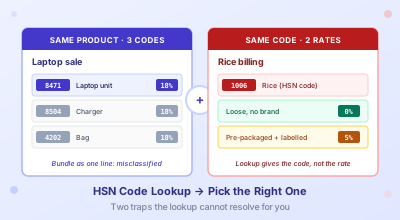
Pick three small businesses that all sell laptops. One books every bill under HSN 8471 like a textbook. Another keeps copying whatever HSN the supplier printed on the bill, which on a recent batch was 8473 even though the products were the same laptops as last quarter. The third lumps the laptop, the bag, and a one-year warranty onto a single line at 8471 because the billing template was set up that way in 2018 and nobody has touched it since. All three are wrong in slightly different ways, and one of them has a notice waiting at the end of the financial year.
HSN classification on a GST bill looks like a lookup. You type the product name into a tool, you copy the code into your invoice, you move on. The lookup is the easy part. What the tool cannot do for you is decide which of the three or four candidate codes actually fits the line you are billing, and that is where most of the field-level mistakes happen.
This post is not a beginners' explainer of what HSN means. There are forty of those and ClearTax has cornered the keyword. What I want to walk through is what to do when the lookup throws back two or three options, when the same product has migrated to a different rate without anyone telling you, and when the wrong digit count silently puts you on a notice list nobody told you existed.
How HSN Actually Works on the Invoice
HSN stands for Harmonized System of Nomenclature. The World Customs Organisation runs it, over two hundred countries use the same six-digit core, and India bolts an extra two digits onto the end for tariff classification. That is why an Indian invoice can carry an eight-digit code where the customs declaration of any other country would carry six.
On a GST bill the code lives next to each line item. It tells the recipient what is being sold, it determines the GST rate that should be applied to that line, and at filing time it gets reported in summary form on GSTR-1. The portal compares the rate you charged against what the schedule prescribes for that code. If you billed eighteen percent on a code the schedule says is twelve, the difference becomes a question.
The first practical thing to know is that the granularity required from you depends on your turnover, not on what the supplier or the buyer would prefer. Aggregate annual turnover above five crore rupees, you must use six digits on every B2B and B2C invoice. Between 1.5 and 5 crore, four digits are enough. Below 1.5 crore you can skip HSN entirely on B2C bills, but you still need four digits on anything B2B.
Two clarifications worth pausing on. The turnover figure is aggregate across every GSTIN under the same PAN, not per-GSTIN. A business with three branch GSTINs each turning over two crore is at six crore aggregate, not at two. And the threshold checks against the previous financial year, not the current one. The bracket you slot into for FY 2026-27 is the one your March 2026 turnover number set, not whatever you are tracking month-to-date now.
The Structure: 2, 4, 6, 8 Digits
| Digits | Level | Example | What It Means |
|---|---|---|---|
| 2 | Chapter | 84 | Nuclear reactors, boilers, machinery |
| 4 | Heading | 8471 | Computers and data processing machines |
| 6 | Sub-heading | 847130 | Portable digital computers (laptops) |
| 8 | Tariff item | 84713010 | India-specific classification |
Descriptions get more specific as you go right, not as you go down a list. A four-digit code includes everything its six-digit children cover. So if your turnover puts you at four digits, you are correct as long as the four-digit chapter is right, even if the eight-digit tariff item would be more specific.
Most B2B traders never need to look at the eight-digit tariff item unless they are doing imports. Customs declarations need it. GST invoices do not.
Same Product, Different Code
The hardest part of HSN is not finding a code. It is finding the right one when two codes look defensible.
Take a laptop sale. The unit itself sits at HSN 8471. The charger, if it is being billed separately, drops down to 8504 in the transformer-and-power-supply chapter. A laptop bag is somewhere else again, in chapter 42 with leather and textile articles. Bundle all three onto one invoice line at 8471 and you have classified two out of three wrong. In practice, since all three currently carry the same eighteen percent rate, it does not move tax on this bill, and most accountants book it that way and forget about it. I have done the same on plenty of bills myself.
The trouble shows up on the buyer's side. They are claiming ITC on three different categories of goods, and one of them (the bag) might fall under their Section 17(5) blocked-credits list as a personal-consumption item. If your single-line bundling hides that distinction, the buyer either rejects the line in IMS or claims credit they should not be claiming. Either way the chase comes back to you eventually.
The right answer for B2B is to bill the laptop, the charger, and the bag on three separate lines, each carrying its own HSN. If your accounting software does not support this cleanly (Tally and Busy both do, Zoho needs a slightly fiddly setup), it is worth half a day to fix the template once. Wholesale electronics dealers feel this hardest because their order-line counts are large and the categories actually do diverge on rate sometimes; service businesses that bill three SaaS lines a month never see the issue.
Same Code, Different Rate
The other direction of the same problem is when one HSN carries more than one rate, depending on packaging or end use.
Rice is HSN 1006. Sold loose, it is exempt. Sold in a sealed retail pack with a brand name on it, it is taxable at five percent. Same HSN. The "pre-packaged and labelled" rule, which the council introduced in July 2022 and tweaked through 2023 and 2025, sits inside the rate schedule, not inside the HSN itself. The lookup tool will tell you "rice = 1006". It cannot tell you whether the rice you are billing is loose or branded, because that is a fact about your transaction, not about the product.
Wheat flour and pulses sit in the same boat. So do paneer and curd at the smaller-quantity end. The traders who get this right have a column in their item master called "packaging type" that drives the rate, and an SOP for new SKUs that requires both fields to be set before the item is allowed onto an invoice template.
Then there is the GST 2.0 cutover that landed on 22 September 2025. A long list of products had their rate moved without their HSN changing. Toothpaste was eighteen percent before the cutover, five percent after. HSN 3306, both before and after. If your invoice template has the rate hard-coded against the HSN (and most do, more than the templates' authors would admit), the September cutover will have left you billing the old rate on the new tax period unless someone went in and updated the master. I have seen at least three masters in the last six months that still had the eighteen percent slab against codes that moved to five. Pull a list of any HSNs in your master that touched the September notification and confirm the rate column on each one. Half-hour job. Saves you a year's worth of small overcharges nobody will notice until a buyer does.
The Wrong Digit Count
Choosing four digits when the schedule wants six is one of those mistakes that does not break anything visible right away, which is why it sits in books for years. The portal accepts a four-digit HSN on an above-5-crore invoice without rejecting it. The summary in GSTR-1 also goes through. What happens is the system flags the return for inspection, and somewhere between three months and a year later, somebody in the field office pulls the file. By then you have a hundred invoices with the same flaw, and the fix is a notice plus an amendment plus a meeting nobody wants to have.
If your turnover crossed five crore in the previous financial year, walk through your invoice templates today and confirm every HSN field is set to six digits, not four. I see this most often in businesses that crossed the threshold quietly during the year and never went back to update the master, especially the ones whose accountant only joined last quarter. The fix is small. The cleanup if you skip the fix is not.
The reverse direction (using six digits when four would do) is harmless except that it occasionally flags a less-specific schedule entry and you have to reconfirm the rate. No notice consequence either way.
How to Use the Lookup Well
The HSN lookup tool on this site searches across roughly a thousand HSN entries, each tagged with the rate the schedule currently puts on it. Type a product name (laptop, mobile phone, rice, paneer) and it returns matching codes with descriptions and rates. Or type a four-digit prefix and it returns every entry inside that heading, which is the better workflow when you already know the chapter and want to drill down.
The thing the lookup actually rewards is searching wide and then narrowing down. "Phone" returns mobile phones, landline phones, accessories, batteries. Look at the chapter each result sits in and pick by chapter, not by best-description match. The lookup matches text. The right answer matches the chapter the product belongs to.
When two results still look equally defensible after that, the official portal at services.gst.gov.in/services/searchhsnsac is the tiebreaker. It carries the full eight-digit tariff schedule with official chapter notes and section headings, and it is the document a field officer will refer to if your classification ever gets questioned. I treat it as the last word, not as a starting point, because navigating it from cold is slower than starting with a name search.
Search 1,000+ HSN Codes by Name or Chapter
Type a product or a four-digit prefix and get the matching codes with their current GST rate. Free, no signup.
Open the HSN Code LookupWhere HSN Touches Reconciliation
A buyer and a seller can carry the same invoice with different HSN codes against the same line item, and the GSTR-2B reconciliation will not flag it. The numbers reconcile because the rate is the same, the taxable value is the same, and 2B does not compare HSN codes between sides. So in pure 2B mechanics it is invisible.
Where it shows up is during a department audit. If your suppliers consistently bill you under one HSN and your purchase register books a different one for the same line item, an inspector with a pivot table can tell. The fix is not heroic. Match the HSN on the bill at booking time, do not let the data-entry person retype it from memory or pick whichever code their muscle memory remembers from last month's bills.
If your bills come in as PDFs (which most do), an extraction layer that lifts the supplier's HSN as printed removes the typing-from-memory failure mode entirely. That is also one less reconciliation surprise three weeks later.
Related Tools
- HSN Code Lookup — search 1,000+ HSN codes by product name or chapter prefix, with current GST rate
- GST Calculator — once you have the rate, work out CGST/SGST/IGST cleanly
- GST Invoice Reader — pull GSTIN, invoice number, amounts, and HSN out of a folder of PDFs into Excel
- GST Invoice Generator — build invoices with HSN, UOM, and rate set per line
- GST 2.0 on Your Invoice — the September 2025 cutover that moved rates without moving HSN codes
- GSTR-2B Reconciliation in Excel — where HSN mismatches stay invisible until an audit
- 7 Common GST Invoice Errors — HSN classification mistakes sit in the same family
- How to Read a GST Invoice — field-by-field walkthrough including the HSN column
- GSTR-9 for FY 2025-26 — the annual return where the HSN-wise summary in Table 17 carries two rate rows for any code whose slab moved on the GST 2.0 cutover
Pulling HSN Out of Vendor PDFs?
Drop a folder of GST invoices in and get one Excel sheet with GSTIN, invoice number, amounts, taxes, and HSN ready to join against your purchase register. Free to try, no signup.
Convert to ExcelFrequently Asked Questions
How do I find the right HSN code for my product?
Start with the lookup tool. Search by product name (laptop, mobile phone, rice, paneer) and you will get a small list of candidate codes with descriptions and rates. The trick is picking the right one when two look defensible. Read the chapter each candidate sits in and pick by chapter, not by best-description match. If two are still close, the official GST portal at services.gst.gov.in/services/searchhsnsac carries the full eight-digit tariff schedule and is the tiebreaker a field officer will refer to later.
What is the difference between 4-digit and 6-digit HSN codes, and which one should I use?
Four digits identify the heading (the product family) and six digits narrow it down to the international sub-heading. Which one you use depends on your aggregate annual turnover in the previous financial year. Above five crore rupees PAN-aggregate turnover, six digits on every B2B and B2C invoice. Between 1.5 and 5 crore, four digits are enough. Below 1.5 crore, you can skip HSN entirely on B2C bills but still need four digits on B2B. Crossing a threshold is checked against last year's number, not what you are tracking this year.
Why does the same product show different GST rates on different invoices?
Two reasons. First, packaging-and-labelling rules. Rice (HSN 1006) is exempt when sold loose and five percent when sold pre-packaged and labelled. The HSN does not change. The rate does. Wheat flour, pulses, paneer, and curd at smaller-quantity packaging all behave the same way. Second, the GST 2.0 cutover on 22 September 2025 moved a long list of rates without changing the underlying HSN. Toothpaste (HSN 3306) went from eighteen percent to five percent on the cutover. If an invoice template still has the old rate hard-coded against the HSN, you will see the old rate on a tax period that should be carrying the new one.
Is HSN code mandatory on every GST invoice?
On B2B bills, yes, always. Four digits below 1.5 crore aggregate turnover, four up to 5 crore, six above. On B2C bills, only the 1.5-crore-and-up bracket has to print HSN at all. Aggregate turnover is checked PAN-level, not per-GSTIN.
What happens if I use the wrong HSN code on a GST invoice?
Depends on which way it is wrong. If the wrong code carries the same rate as the right one, nothing breaks visibly and the bill clears reconciliation cleanly. The exposure shows up at the next departmental audit, where a pivot of HSN against item description on a sample of invoices can flag systematic misclassification. If the wrong code carries a different rate, the GSTR-1 summary will show a mismatch between the rate you charged and what the schedule prescribes for that code, and the portal will eventually surface the difference as a question. The cleanest fix in either case is to correct the item master, then issue a credit note plus a fresh invoice for the affected period if the rate consequence is material.