Accept, Reject or Pending
Your supplier files the invoice. You decide whether it becomes credit. Under the Invoice Management System, that decision is one button press — and not pressing it is also a decision.
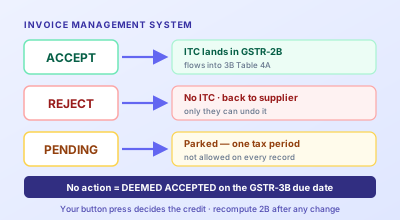
Input tax credit used to be something you claimed. Now it is something you approve. Every B2B invoice, debit note and credit note your suppliers file lands on your Invoice Management System dashboard, and what you do there — Accept, Reject, Pending, or nothing at all — determines what your GSTR-2B contains. Since 1 April 2026 the portal will not let you file a GSTR-3B claiming more ITC than that 2B shows. Your 2B is now the ceiling, and IMS is the only place you can change it.
Most guides describe the three buttons and stop. The useful question is narrower: given a specific record sitting on your dashboard, which button, and what does the wrong one cost? This post answers that, plus the four traps that account for nearly every IMS accident we hear about — the deemed-accepted default, the rejection you cannot undo, the credit note that was never yours to reject, and the pending clock that now runs out.
Why the Button Became the Whole Game
For years GSTR-2B was described in the law as an auto-generated statement. You received it; you reconciled against it; you claimed what you believed was right. Notification 16/2025-Central Tax dated 17 September 2025 brought the Finance Act, 2025 changes into force from 1 October 2025, and one of them deleted "auto-generated" from Section 38. Read alongside Rule 60, the statement stopped being something the system hands you and became something your IMS actions build. Credit is available on accepted records in your 2B — accepted explicitly, or accepted by default because you did nothing.
The second half of the change landed on 1 April 2026, when the portal began hard-blocking a GSTR-3B whose Table 4 credit exceeds the 2B figure. Before that, a mismatch was an argument you could have later, through correspondence or a DRC-01C intimation. Now it is a wall in front of the submit button. The two changes together mean a single thing for a buyer: the last moment you can influence your own ITC is while the records are still sitting in IMS. After that you are only reporting what you already decided.
What Each Action Actually Does
The three buttons differ in more than outcome. They differ in who can reverse them, and that asymmetry is where the money is.
| Action | Effect on your GSTR-2B | Effect on the supplier | Can you undo it? |
|---|---|---|---|
| Accept | Record enters 2B as available ITC, flows to 3B Table 4A | None — their filing stands | Yes, until you file 3B |
| Reject | Kept out of 2B; shown as ITC not accepted | Record returns to their dashboard for correction; for a credit note, their liability is added back | Not alone — the supplier must re-furnish it |
| Pending | No credit this period; carried to the next | None | Yes — but only for one tax period, then you must decide |
| No action | Deemed accepted on the 3B due date; full value enters 2B | None | Only before the due date |
Notice the third column. Accept and Pending are yours to change; Reject hands control to somebody else. That single fact should shape how you use the dashboard: reject only what you are sure is wrong. An invoice you cannot immediately identify is not the same as an invoice that is wrong.
The Decision Guide
Here is the mapping we would give a new accounts assistant on day one. It covers most of what a normal month throws up.
| What you're looking at | Press | Why |
|---|---|---|
| Invoice matches your purchase register on GSTIN, number, date and tax split | Accept | The ordinary case — the credit is yours |
| Invoice value is higher than the bill you hold | Reject | Accepting locks in a claim you can't support; the supplier amends and re-files |
| Invoice belongs to another entity or another GSTIN of yours | Reject | It is not your credit at all; leaving it becomes a wrong claim by inaction |
| Duplicate of a record you already accepted | Reject | Deemed acceptance would double the credit |
| Genuine bill, but goods not yet received | Pending | Section 16(2)(b) needs receipt; park it and take the credit in the period you receive it |
| You don't recognise it, but it looks plausible | Pending, then chase | Rejecting a legitimate bill is expensive to undo — verify first |
| Credit note you agree with | Accept, declaring the reversal amount | Reverse only the credit you actually availed |
| Credit note you dispute | Pending, then Reject if it stays wrong | Rejecting pushes the liability back to the supplier — be sure first |
You Can't Action What You Can't Match
Every one of those decisions compares a portal record against a bill in your folder. Drop your purchase PDFs in and get GSTIN, invoice number, date and the CGST/SGST/IGST split in one Excel sheet to match against.
Convert Invoices to ExcelTrap One: Silence Is a Yes
Deemed acceptance is the default that surprises people who assume an untouched record is a parked record. It is not. Anything you have not actioned by the GSTR-3B due date enters your 2B as available credit at the supplier's reported value. In a clean month that is convenient. In a month where a supplier fat-fingered a value, or filed a bill against your GSTIN by mistake, it means you claimed something you never looked at — and because the claim came through 2B, the portal has no complaint at filing time. The problem surfaces later, in an audit or a departmental reconciliation, with interest running from the date the credit was used.
The practical defence is a monthly sweep rather than a monthly search. You are not hunting for problems in a long list; you are confirming that every line on the dashboard corresponds to a bill you hold, and actioning the few that do not.
Trap Two: A Rejection You Can't Take Back
Reject is the only action that leaves your control. Once you reject a record it drops out of your 2B and reappears on the supplier's dashboard. To get the credit back, the supplier has to furnish the same record again — in GSTR-1A for the same tax period, or in the amendment table of a subsequent GSTR-1 or IFF. Then it returns to your IMS, you accept it, you recompute 2B, and the credit finally lands.
Suppliers resist this because they assume re-filing means paying tax twice. It does not, and this is the sentence to send them: the amendment tables work on the delta between the original record and the amended one, so re-furnishing an identical record produces a differential liability of zero. What actually happens is that the rejection adds the liability back in their open GSTR-3B, and the re-furnished record reduces it again by the same amount — a round trip with no net cost, just work. Knowing that turns an argument into a request.
The cost of the round trip is time, and time here is measured in tax periods. If the supplier only gets to it next month, your credit moves to next month's 2B. That is why "reject anything I don't recognise" is a bad rule and "verify, then reject only what's wrong" is a good one.
Trap Three: The Credit Note Runs the Other Way
Every other record on the dashboard increases your credit. A credit note reduces it, and that inverts the meaning of the buttons. Accepting a credit note lowers your ITC. Rejecting one keeps your ITC high — and adds the supplier's liability back on their side. This is why a reflexive "reject anything that reduces my credit" is the single most expensive habit on IMS: it manufactures a dispute with a supplier over an amount you will almost certainly have to reverse anyway once the goods return is reconciled.
There is also a genuine fairness problem the portal now solves. If you never availed the full credit on the original invoice, reversing the credit note's entire face value takes back more than you took. From the October 2025 tax period IMS lets you declare the reversal amount when you accept a credit note, so the reversal matches what you actually availed, with a remarks facility to record why. Use it rather than rejecting the note to protect the difference.
Trap Four: The Pending Clock
Pending used to be an open-ended parking space, limited only by the Section 16(4) outer date for taking credit. From the October 2025 tax period that changed for a specified set of records: they can be held Pending for one tax period only — one month for monthly filers, one quarter under QRMP. After that you must Accept or Reject, and if you do neither, deemed acceptance takes over.
Pending is also not offered on everything. It is available on a defined list, which includes credit notes and their upward amendments, downward amendments of a credit note whose original was rejected, downward amendments of an invoice or debit note where the original was accepted and the 3B already filed, and the equivalent e-commerce operator documents. And a separate category of records cannot be actioned in IMS at all — those where ITC is ineligible because of the place-of-supply rules or the Section 16(4) time limit, and supplies liable to reverse charge. Those appear for information; the credit decision on them sits elsewhere in your return.
The Two Dates That Turn Actions Into Numbers
IMS itself is continuous. Records appear as suppliers save or file them in GSTR-1, GSTR-1A or the IFF, so the dashboard is never empty and never final. Two moments matter.
The 14th, when the draft GSTR-2B is generated from your actions as they stand. This is the snapshot most people treat as the month's answer.
The GSTR-3B filing, up to which your actions remain editable. Anything you change after the 14th — and something always changes, because suppliers keep filing — does not reach your return until you press Recompute GSTR-2B. Skipping the recompute is a quiet way to file against a stale statement and wonder why Table 4A doesn't match the working you did on the 18th.
A workable rhythm: action the obvious records as they arrive through the month, do the full sweep on the 14th against your purchase register, chase exceptions between the 15th and 18th, recompute once when the chasing stops, and file. The GSTR-2B reconciliation workflow is the sweep itself; IMS is where its conclusions get executed.
Doing It at Volume
Clicking through a few dozen records is fine. Clicking through a few thousand is not, and GSTN acknowledged as much with the Excel-based offline IMS tool released in April 2026, which lets you pull records down, mark Accept, Reject or Pending in bulk in a spreadsheet, and push the actions back without staying logged into the portal. That solves the mechanics of the actioning.
It does not solve the input. To decide the action you still need your own side of the comparison: every purchase bill's GSTIN, number, date, taxable value and tax split, in a sheet, before the 14th. That is exactly the gap our invoice-to-Excel converter exists to close — a folder of purchase PDFs in, one structured sheet out, ready to match. And where a record comes from a vendor you have never dealt with, bulk GSTIN verification (1 lookup credit per GSTIN found) tells you in one pass whether those GSTINs are even active before you accept credit against them.
What's Coming Next
The direction of travel is clear: GSTR-3B is turning from a form you fill into a form you verify. Tables 3.1 and 3.2 — outward liability — were hard-locked from July 2025. The April 2026 change capped Table 4 at the 2B figure. The widely reported next step is a full lock of Table 4A to the 2B value, with manual editing removed altogether, from the July 2026 tax period onward; reversals in Table 4(B), reclaims in 4(D) and reverse-charge liability in 3.1(d) would stay manual.
Treat that last one as reported rather than settled — it has been described in advisories and trade commentary rather than a notification you can cite, and phase dates in GST have slipped before. Confirm the position for your own filing before you plan around it. What is not in doubt is the underlying shift, and it has already happened: the number in your return is decided upstream, in IMS, by you or by your silence.
What to Take Away
Accept puts credit in your 2B; Reject keeps it out and hands the fix to your supplier; Pending defers the decision for exactly one tax period on the records where it is allowed; doing nothing accepts the record on your behalf at the supplier's value. Reject only what you know is wrong, because it is the one action you cannot reverse alone. Treat credit notes as the mirror image — accept them with a declared reversal amount rather than rejecting them to hold on to credit. Sweep the dashboard against your purchase register by the 14th, recompute GSTR-2B after any late change, and file. The claim you make in Table 4A stopped being a number you enter some time ago; it is the sum of the buttons you pressed.
Related Tools
- GST Invoice Reader — turn a folder of purchase PDFs into one Excel sheet to match against your IMS dashboard
- Bulk GSTIN Verification — check a whole vendor list is active before you accept credit against it (1 lookup credit per GSTIN)
- GST Set-Off Calculator — once the credit is in, work out net cash payable in the correct legal order
- GSTIN Details Lookup — confirm a single unfamiliar supplier before you action their invoice (1 lookup credit)
- GSTR-2B Reconciliation in Excel — the monthly match that tells you which button to press
- Blocked ITC Under Section 17(5) — credit that stays ineligible even after you accept the record
- The GST Set-Off Order — why cash is still due while you hold unused ITC
Matching a Month of Purchase Bills Before the 14th?
Drop the PDFs in and get GSTIN, invoice number, date, value and the CGST/SGST/IGST split in one Excel sheet — the side of the comparison the portal can't give you. Free to try, no signup.
Convert to ExcelFrequently Asked Questions
What happens if I take no action on an invoice in IMS?
It is treated as deemed accepted. Any record you leave untouched flows into your GSTR-2B as available credit on the GSTR-3B due date, exactly as if you had pressed Accept. Inaction is not neutral — it is a silent yes to whatever your supplier reported, at whatever value they reported. That is fine for clean invoices, and it is precisely how wrong values, duplicates and bills filed against the wrong GSTIN end up inside a claim nobody consciously made.
What is the difference between Accept, Reject and Pending in IMS?
Accept puts the record into your GSTR-2B as eligible credit, which flows into Table 4A of GSTR-3B. Reject keeps it out of 2B entirely and pushes the record back to the supplier's dashboard for correction through GSTR-1A or the amendment table of a later GSTR-1 or IFF. Pending parks it without deciding — no credit this period, nothing sent back to the supplier — but Pending is offered only on a specified list of record types and, from the October 2025 tax period, only for one tax period.
I rejected an invoice by mistake. How do I get the ITC back?
You cannot reverse it yourself. Once rejected, the record leaves your GSTR-2B and only the supplier can put it back, by furnishing the same invoice again in GSTR-1A for the same period or in the amendment table of a subsequent GSTR-1 or IFF. It then reappears in your IMS dashboard; you accept it and recompute GSTR-2B to bring the credit in. Because amendment tables work on the delta between original and amended record, a supplier re-furnishing an identical invoice sees no net increase in liability — useful when you ask them to do it.
Do I have to recompute GSTR-2B after changing an IMS action?
Yes, if you change an action after the draft GSTR-2B is generated on the 14th. The draft is a snapshot of your actions at that moment, so anything you press afterwards does not reach GSTR-3B until you use Recompute GSTR-2B. Actions stay editable until you file GSTR-3B for the period, so the practical rule is: finish your actions, recompute once, then check Table 4A matches your working before filing.
Should I reject a credit note in IMS?
Almost never as a reflex. Rejecting a credit note keeps the reduction out of your GSTR-2B, so your credit stays at the higher original figure, and the supplier's liability for that note is added back in their open GSTR-3B. If the note is genuinely wrong, reject it and tell them why. If you only need time to verify it against the goods return, use Pending, which holds for one tax period. And when you do accept a credit note, IMS lets you declare the reversal amount, so you reverse only the credit you actually availed rather than the note's full face value.